






 Settings
 Fast Delivery
 Free Shipping
 Incoterms
 Payment Types


 Marketplace Product

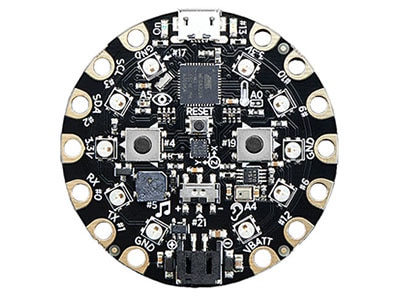
Circuit Playground
-
Circuit Playground features an ATmega32u4 processor, just like the popular Flora. The board's also round and has alligator-clip pads around it so you do not have to solder or sew to make it work. You can power it from USB, an AAA battery pack, or with a Lipoly battery (for advanced users). Just program your code into the board then take it on the go. Circuit Playground has built-in USB support. Built in USB means you plug it in to program it and it just shows up. All you really need is a Micro-B USB cable - so no additional purchases are necessary. With the 1.6.4+ Arduino IDE, it takes only a few seconds to add support. The Circuit Playground has USB HID support, so it can act like a mouse or keyboard and attach directly to computers.
Getting Started
- Introducing Circuit Playground
- How to get Python Running on a Circuit Playground Express
- What is MakeCode
- CircuitPython Made Easy on Circuit Playground Express
- Circuit Playground Lesson #0
- Circuit Playground Digital Input
- Circuit Playground Analog Input
- Circuit Playground's Motion Sensor
- Circuit Playground Sound and Music
Other Resources
- DIY Circuit Playground Shields
- Case for Circuit Playground
- How to Drive NeoPixels using Circuit Playground Express
- NeoPixels with MakeCode
- Sensors in MakeCode
- Infrared Transmit and Receive on Circuit Playground Express in C++
- Circuit Playground & Bluetooth Low Energy
- Circuit Playground Express (& other ATSAMD21 Boards) DAC Hacks
- Circuit Playground Firmata
- Python on Hardware
- Using the Android CircuitPython Editor
- CRICKIT Exhibit Demo Board
Products









 United Kingdom